Thursday, July 2, 2020

Replacing Background Colors in Cells

It's fairly obvious that you can change the background colors of any cells manually, so there is no need to go into that option for making the changes. What you need to do is use a simple tool, such as the Find and Replace tool, to make the color changes. Follow these steps:
  1. Press Ctrl+H to display the Replace tab of the Find and Replace dialog box.
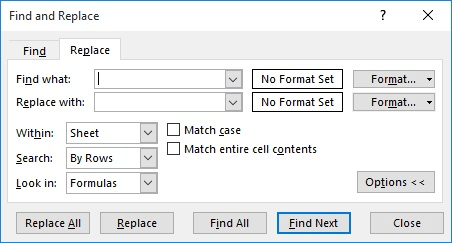
  2. Expand the dialog box by clicking the Options button. (See Figure 1.)
  3. Figure 1. The Replace tab of the Find and Replace dialog box.
  4. Click the Format button at the right side of the Find What box. Excel displays the Find Format dialog box.
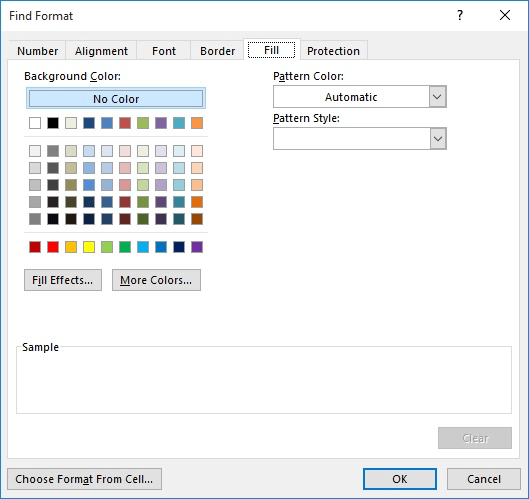
  5. Make sure the Fill tab is selected. (See Figure 2.)
  6. Figure 2. The Fill tab of the Find Format dialog box.
  7. Use the controls in the dialog box to specify the background color you want to replace.
  8. Click OK.
  9. Click the Format button at the right side of the Replace With box. Excel displays the Replace Format dialog box.
  10. Make sure the Fill tab is selected.
  11. Use the controls in the dialog box to specify the background color you used when changing the cells.
  12. Click OK.
  13. Click Replace All.
If you find yourself needing to make the same color changes over and over (for instance, always changing from red to blue), then you may be interested in using a macro to do the changes. The following example could be assigned to a shortcut key or added to the Quick Access Toolbar so you can use it quickly:
Sub ChangeColor()
    Dim rCell As Range
    If Selection.Cells.Count = 1 Then
        MsgBox "Select the range to be processed."
        Exit Sub
    End If
    For Each rCell In Selection
        If rCell.Interior.Color = RGB(255, 0, 0) Then  'red
            rCell.Interior.Color = RGB(0, 0, 255)      'blue
        End If
    Next rCell
End Sub

Friday, April 3, 2020

Drawing rotated text on a HTML5 canvas

Posting this in an effort to help others with similar problems. I solved this issue with a five step approach -- save the context, translate the context, rotate the context, draw the text, then restore the context to its saved state.
I think of translations and transforms to the context as manipulating the coordinate grid overlaid on the canvas. By default the origin (0,0) starts in the upper left hand corner of the canvas. X increases from left to right, Y increases from top to bottom. If you make an "L" w/ your index finger and thumb on your left hand and hold it out in front of you with your thumb down, your thumb would point in the direction of increasing Y and your index finger would point in the direction of increasing X. I know it's elementary, but I find it helpful when thinking about translations and rotations. Here's why:
When you translate the context, you move the origin of the coordinate grid to a new location on the canvas. When you rotate the context, think of rotating the "L" you made with your left hand in a clockwise direction the amount indicated by the angle you specify in radians about the origin. When you strokeText or fillText, specify your coordinates in relation to the newly aligned axes. To orient your text so it's readable from bottom to top, you would translate to a position below where you want to start your labels, rotate by -90 degrees and fill or strokeText, offsetting each label along the rotated x axis. Something like this should work:
 context.save();
 context.translate(newx, newy);
 context.rotate(-Math.PI/2);
 context.textAlign = "center";
 context.fillText("Your Label Here", labelXposition, 0);
 context.restore();
.restore() resets the context back to the state it had when you called .save() -- handy for returning things back to "normal".

Tuesday, March 17, 2020

How to add rowspan in table column if values is the same using jQuery

By using jQUery

<table border=1 id="myTable">
        <tr>
            <td>A</td>
            <td>1</td>
        </tr>
        <tr>
            <td>A</td>
            <td>2</td>
        </tr>
        <tr>
            <td>b</td>
            <td>1</td>
        </tr>
        <tr>
            <td>c</td>
            <td>1</td>
        </tr>
        <tr>
            <td>c</td>
            <td>1</td>
        </tr>
    </table>
    <script src="https://ajax.googleapis.com/ajax/libs/jquery/1.11.2/jquery.min.js"></script>

<script>
    $(document).ready(function() {
       var span = 1;
       var prevTD = "";
       var prevTDVal = "";
       $("#myTable tr td:first-child").each(function() { //for each first td in every tr
          var $this = $(this);
          if ($this.text() == prevTDVal) { // check value of previous td text
             span++;
             if (prevTD != "") {
                prevTD.attr("rowspan", span); // add attribute to previous td
                $this.remove(); // remove current td
             }
          } else {
             prevTD     = $this; // store current td 
             prevTDVal  = $this.text();
             span       = 1;
          }
       });
    });
</script>

Thursday, March 5, 2020

jQuery Vertical Scrolling Web Ticker Plugin - vticker

vticker is a simple jQuery plugin for creating a vertical scrolling ticker widget with one line of javascript code. Items can be paused when the mouse hovers over an item.

Basic Usage:

1. Inlcude jQuery library and jQuery vticker plugin on the web page
2<script src="jquery.vticker.js"></script>
2. Create the html for the web ticker
1<div id="example">
2<ul>
3    <li>Item 1</li>
4    <li>Item 1</li>
5    <li>Item 3</li>
6    ...
7</ul>
8</div>
3. Initialize the plugin.
1<script>
2$(function() {
3$('#example').vTicker();
4});
5</script>
4. Available options.
01<script>
02$(function() {
03$('#example').vTicker({
04speed: 700,
05pause: 4000,
06showItems: 1,
07mousePause:true,
08height: 0,
09animate:true,
10margin: 0,
11padding: 0,
12startPaused:false});
13});
14</script>


Source: https://www.jqueryscript.net/text/jQuery-Vertical-Scrolling-Web-Ticker-Plugin-vticker.html

How to change the PHP version for subfolders or subdomains

  How to change the PHP version for subfolders or subdomains Setting a specific PHP version for a specific websites, subfolders or subdomain...